
No products in the cart.

-3%
Epson printers
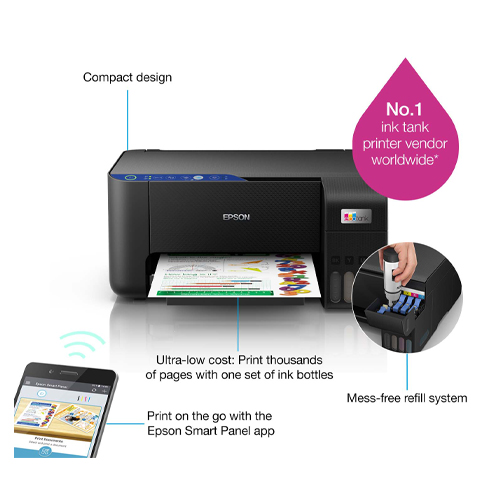
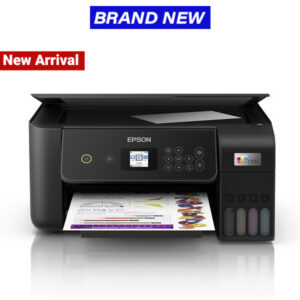
Epson L3251 EcoTank Printer with Wi-Fi
Availability:
Out of stock
- Printer Brand: Epson
- Printer Functions: Print, Scan and copy
- Max print resolution: 5760 × 1440 dpi
- Connectivity: Wi-Fi, USB and Ethernet
- Print Speed: Up to 33 ppm (Black); 15 ppm (Colour)
- Scanner type: Flatbed colour image scanner
- Supported OS: macOS and Windows
- Toner yield: Black(4,500 pages); Colour (7,500 pages)
KSh27,999 KSh29,000 (EX VAT)
Out of stock
Epson L3251 printer Specs
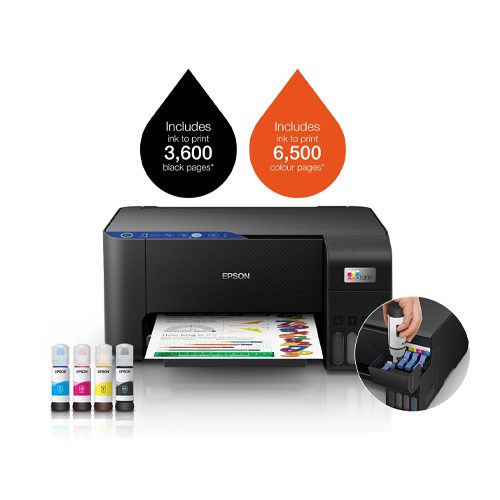
The Epson L3251 is an amazing consumer printer with advanced features like Wireless printing. The L3251 is an economical printer with high print yields (8,100 pages in black; 6,500 pages in colour) in high quality resolution. The Epson L3251 printer price in Kenya is Ksh.26,999
Epson L3251 printer technical specs:
| Printer Functions | Print, Scan, Copy |
| Print Resolution Best | 5760 x 1440 dpi |
| Print Speed in black and colour | 33 ppm and 15 ppm respectively |
| Scanner type | Contact image sensor |
| Scan speed single-sided | 11 sec in black ; 28 sec |
| Maximum scan area | 216 x 297 mm |
| Best copy resolution | 600 x 600 dpi |
| Copy speed in black and colour | 7.7 ipm (black); 3.8 ipm (colour) |
| Maximum copies from standalone | 20 copies |
| Best scan resolution | 1200 x 2400 dpi |
| Number of paper trays | 1 |
| Supported paper formats | A4; A6; A5; B5; Envelope; C6; Letter; Legal |
| Paper output max capacity | 30 sheets |
| Paper input max capacity | 100 sheets |
| Connectivity (Interfaces) | USB, Wi-Fi, Wi-Fi Direct |
| Mobile printing app | Epson Connect |
| Weight | 3.9 kg |
| Compatible OS | macOS X 10.6.8 or later; Windows 7 or later; Windows Server 2003 or later |
| Dimensions | 37.5 x 34.7 x 17.9 in cm |
| Product weight | 3.9 kg |
Epson L3251 ink, driver’s and installation:
Ink:
This inkjet printer uses ink bottles, which are specifically prescribed from Epson. The L3251 uses the 103 ink series 65ml bottles which come in four colors: black, yellow, cyan and magenta. The inks are capable of printing 4500 pages in black and 7,500 pages in colour.
Driver’s:
For you to communicate and use this inkjet printer, you need the appropriate drivers. The L3251 can be connected to your computer via Wi-Fi or USB connection. You can also print using a smartphone device using the dedicated HP smart app. You can download the L3251 software drivers from the Epson official website. Inside the box, you will also find the drivers found on a CD that comes with the printer.
How to install the L3251:
Installing the L3251 can seem like a daunting task, but in reality it’s really a very simple process that takes a very short time. If you encounter any difficulties, don’t hesitate to contact us. Here are the steps:
- Connect the printer to a power source
- Install the inks that come boxed with the printer
- Connect the printer to your computer via network, USB or Wi-Fi interface : For a network connection, you will require an Ethernet cable. To print via Wi-Fi, you will need to configure the Wi-Fi details like password by following the prompts on the printer.
| Printer brand | |
|---|---|
| Printer connectivity type | |
| Printer function type | |
| Printer output | |
| Printing Technology | |
| Scanner type |
Based on 0 reviews
Be the first to review “Epson L3251 EcoTank Printer with Wi-Fi”
You may also like…
- Epson printers
Epson L3256 EcoTank A4, Printer with Wi-Fi
- Printer Brand: Epson
- Print Resolution Maximum: 5760 x 1440 dpi
- Functions: 3-in-1 Printer (Print, Scan, Copy)
- Wireless Printing
- Connectivity: Wi-Fi, USB 2.0, Network (TCP/IPv4, TCP/IPv6)
- Supported OS: Windows and macOS
- Printing Method: On-demand inkjet
- Print Speed in Black: 31ppm
- TO CLAIM YOUR CASHBACK VISIT: www.epson.eu/ecotankcashback
The EPSON EcoTank L3256 is an All-in-One Printer with impressive printing, copying and scanning capability. Print wirelessly from your smart device, enjoy spill-free refills with the L3256. A good printer for photo printing thanks to its high resolution colour dpi.
SKU: n/a - Epson printers
Epson L3250 EcoTank All-In-One Inkjet Printer
- Printer Brand: Epson
- Functions: Print, Scan and Copy
- Colour: Black
- Print quality (Best): 5760 × 1440 dpi
- Print Speed: Up to 33.0 ppm (Black); 15.0 ppm (Colour)
- Connectivity: Wi-Fi, USB, Network
- Supported operating system: Windows and macOS
- Shipping: See shipping rates
SKU: EPSONL3250



There are no reviews yet.